





Prefire transforms your #Preview blocks into:
- ✅ Snapshot tests
- ✅ Playbook views
- ✅ Visual flows with states and user stories
- ✅ Living documentation — fully automated

- 🧠 Smart Preview Parsing — including
#Preview,@Previewable - 📸 Snapshot Testing — automatic test generation from previews
- 📚 Playbook View — auto-generated interactive component catalog
- 🏃 Flow-aware — build user stories from multiple preview steps
- 🧩 UIKit Support — support for
UIViewandUIViewController - ⚙️ SPM + Xcode Plugins — works in CLI, Xcode build phases, or CI
- 🧠 Fast Caching — fingerprint-based AST and body caching avoids redundant work
- ✍️ Stencil Templates — customize output with your own templates
- 🔥 Save Time - Generate tests and documentation automatically
- 🔥 Stay Consistent - Keep previews and tests always in sync
- 🔥 Improve Quality - Catch visual regressions before users do
- 🔥 Boost Collaboration - Share living documentation with your team
📦 Example project available at: Prefire Example
// Package.swift
dependencies: [
    .package(url: "https://github.com/BarredEwe/Prefire.git", from: "4.0.0")
],
.testTarget(
    plugins: [
        // For Snapshot Tests
        .plugin(name: "PrefireTestsPlugin", package: "Prefire")
    ]
)#Preview {
Button("Submit")
}Just run the test target 🚀 — Prefire will auto-generate snapshots based on your previews.
💡 If your test target is empty, Prefire will still generate files and snapshot code during build.

Supports:
- ✅ SPM Plugin (
Package.swift) - ✅ Xcode Build Tool Plugin
- ✅ CLI (
brew install prefire) - ✅ GitHub Actions / CI
See detailed setup in the Installation guide
- Finds all
#PreviewandPreviewProviderblocks - Supports modifiers:
.prefireEnabled(),.prefireIgnored()
- Based on file modification date + SHA-256 of inputs
- Avoids re-parsing if nothing changed
- Uses
Stenciltemplates - Respects
.prefire.ymlconfiguration
- Groups by
UserStory,State - Outputs
PreviewModels.generated.swift
To generate tests and playbook, simply mark your preview using the PrefireProvider protocol:
struct Text_Previews: PreviewProvider, PrefireProvider {
    static var previews: some View { ... }
}
If you use the #Preview macro, 🔥Prefire will automatically find it!
If you don't need it, mark view - .prefireIgnored():
#Preview {
    Text("")
        .prefireIgnored()
}
If you want to disable the automatic get of all previews, use the setting preview_default_enabled: false. Then to include preview in the test, you need to call the .prefireEnabled():
#Preview {
    Text("")
        .prefireEnabled()
}To use Playbook, simply use PlaybookView
- If you want to see a list of all the Views, use
isComponent: true - If you want to sort by UserStory, use
isComponent: false
import Prefire

struct ContentView: View {
    var body: some View {
        PlaybookView(isComponent: true, previewModels: PreviewModels.models)
    }
}Just run generated tests 🚀 All tests will be generated in the DerivedData folder.
Plugin PrefireTestsPlugin will handle everything for you 🛠️
For detailed instruction, check out swift-snapshot-testing or examine an example project.
Prefire provide new commands for previews:
-
You can set the delay, precision and perceptualPrecision parameters for the snapshot:
.snapshot(delay: 0.3, precision: 0.95, perceptualPrecision: 0.98)
static var previews: some View {
    TestView()
        .snapshot(delay: 0.3, precision: 0.95, perceptualPrecision: 0.98)
}
-
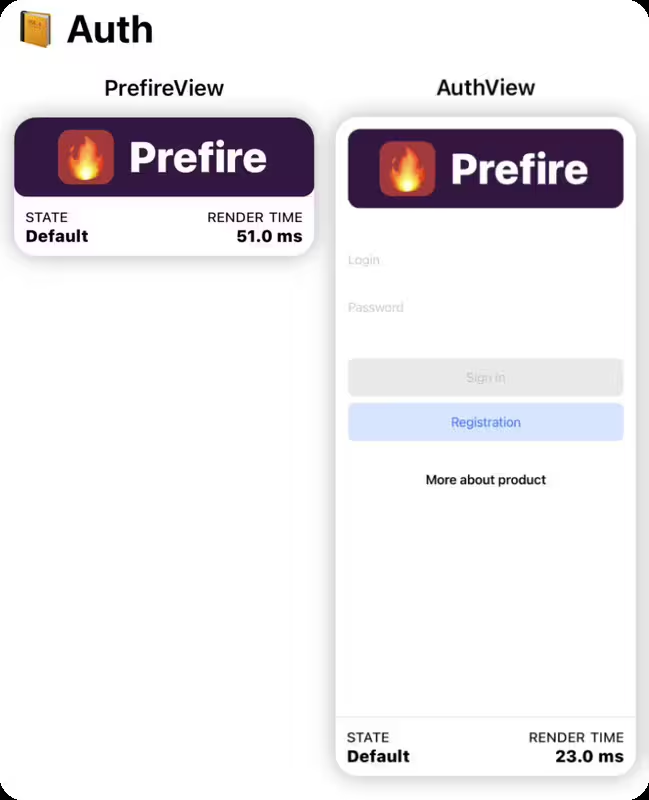
Function for connecting preview together in one Flow:
.previewUserStory(.auth)
static var previews: some View {
    PrefireView()
        .previewUserStory(.auth)
}

static var previews: some View {
    AuthView()
        .previewUserStory(.auth)
}
For example Authorization flow:
LoginView,OTPViewandPincodeView
-
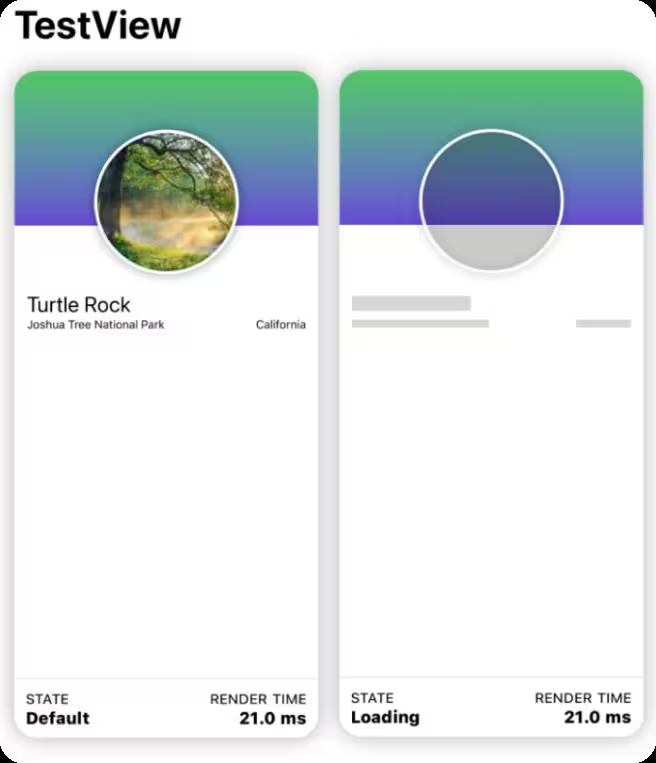
If a preview contains more than one
View, you can markStatefor these views..previewState(.loading)
static var previews: some View {
    TestView("Default")

    TestView("Loading")
        .previewState(.loading)
}
| Feature | Modifier |
|---|---|
| Include in snapshot | .prefireEnabled() |
| Exclude from snapshot | .prefireIgnored() |
| Group in a flow | .previewUserStory(.auth) |
| Mark a UI state | .previewState(.error) |
| Customize snapshot | .snapshot(delay: 0.3, precision: 0.95) |
# Generate snapshot tests
prefire tests

# Generate playbook models
prefire playbook
Run prefire tests --help or prefire playbook --help for more options.
See detailed configuration in the Configuration guide
test_configuration:
  target: MyApp

playbook_configuration:
preview_default_enabled: trueWhen preparing for distribution, you may want to exclude your PreviewProvider and mock data from release builds. This can be achieved by wrapping them in #if DEBUG compiler directives. Alternatively, you can pass a compiler flag to exclude PreviewModels from release builds.
To exclude PreviewModels using Swift Package Manager, pass the PLAYBOOK_DISABLED swift setting in the package that links PrefirePlaybookPlugin:
swiftSettings: [
    .define("PLAYBOOK_DISABLED", .when(configuration: .release)),
]
If you are using Xcode, you can pass the compiler flag in the Xcode build settings:
SWIFT_ACTIVE_COMPILATION_CONDITIONS = PLAYBOOK_DISABLED;
PrefireCore— AST + preview parsing, caching, logicPrefireGenerator— handles stencil templating + snapshot generationPrefireCacheManager— unifies caching forTypesandPreviewsPrefireTestsPlugin/PrefirePlaybookPlugin— SPM/Xcode integrationsprefire— CLI entry point, calls shared generator code
- Swift 5.6 or higher
- Xcode 14.0 or higher
- iOS 14 or higher
NavigationView in Preview not supported for Playbook
- Consider using other views or layouts for your Playbook needs.
Running Prefire via CI
- To run Prefire via Continuous Integration (CI), you need to configure permissions:
defaults write com.apple.dt.Xcode IDESkipPackagePluginFingerprintValidatation -bool YES
Xcode is unable to generate tests in a custom path.
- To resolve this, you’ll need to disable the sandbox for file generation by running the following command in your terminal:
defaults write com.apple.dt.Xcode IDEPackageSupportDisablePluginExecutionSandbox -bool YES
We welcome contributions! Please follow these steps:
- Fork the repository
- Create a feature branch
- Submit a Pull Request
Prefire is released under the Apache License 2.0. See LICENSE for details.