
A visual command center for the coding agents you already use.



Codius is an open-source visual workspace for local coding agents. It combines agent orchestration, worktrees, Git review, terminals, schedules, MCP integration, an embedded browser, and visible browser automation.
Connect a Codius API key once in the App to make Codius models available automatically to compatible agents. Users remain free to select Codex, Claude Code, GitHub Copilot, OpenCode, Pi, custom ACP agents, and other supported providers.
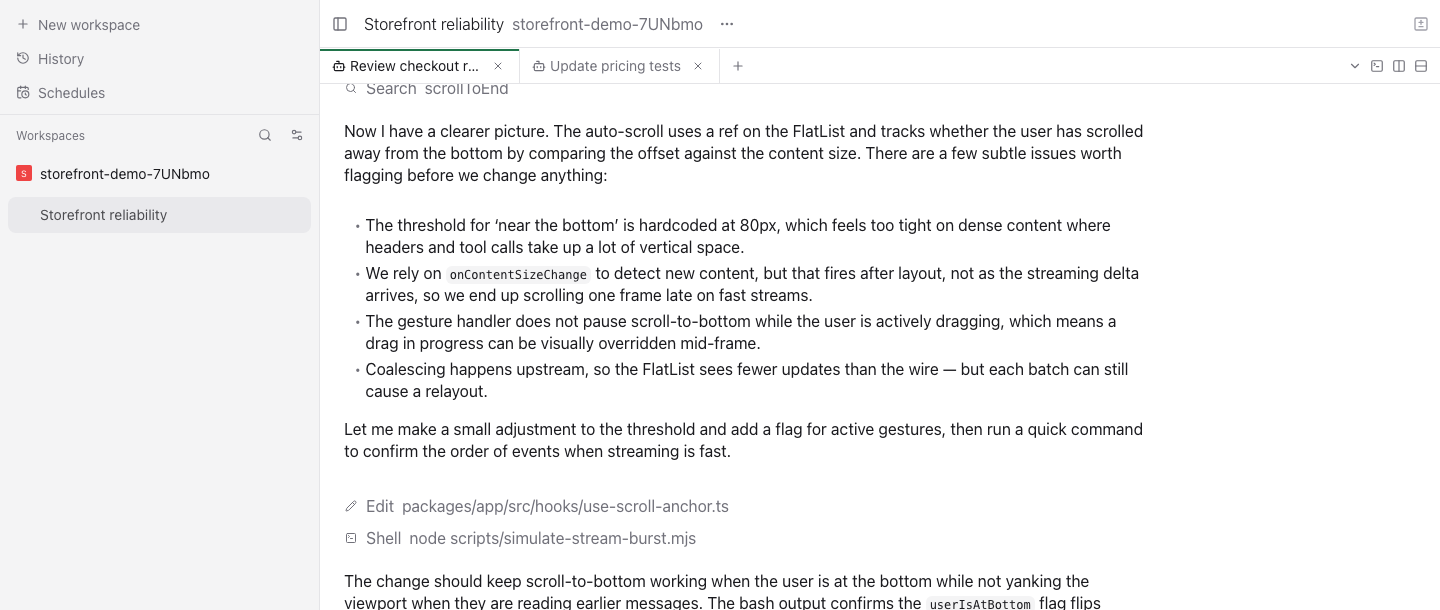
See the real desktop, command-center, and mobile product captures
Codius Coding Plans
        │
        ▼
Codius API — OpenAI-compatible inference
        │
        ▼
Codius App
        │
        ├── Claude Code
        ├── Codex
        ├── GitHub Copilot
        ├── OpenCode
        ├── Pi
        └── custom agents
Browser · Terminal · Git · Worktrees · Diffs · Schedules · Agents
The App launches the agent selected by the user. When Codius model access is enabled, it supplies that agent's session-scoped provider settings without rewriting the agent's configuration files. Local files, Git operations, terminals, and browser interaction stay on the user's machine.
- One-time model connection: Add a Codius API key once and use the available Codius models with compatible agents.
- Multi-agent: Use Codex, Claude Code, Copilot, OpenCode, Pi, or custom ACP providers.
- Parallel agents: Run isolated coding agents simultaneously in separate workspaces and worktrees.
- Inline browser: Open development sites in browser panels beside chat, terminal, logs, and diffs.
- Visible browser automation: Approved agents can navigate, click, type, fill forms, upload workspace files, inspect console/network output, and take screenshots in the same browser tab the user sees.
- Git workflow: Review diffs, stage changes, commit, and continue to pull-request workflows.
- Schedules and loops: Run repeatable agent tasks and orchestration flows.
- Local-first: The daemon and coding agents run on infrastructure controlled by the user.
| Environment | Website | OpenAI-compatible API |
|---|---|---|
| Development | https://dev.codius.dev |
https://devapi.codius.dev/v1 |
| Production | https://codius.ai |
https://api.codius.ai/v1 |
Install at least one supported coding agent. To use Codius models, add a Codius API key under Host settings → Providers. The App validates and stores the key privately, then configures compatible agent sessions automatically. Agents may also use their own accounts or provider credentials.
Codius stores its daemon configuration, sessions, and workspace metadata under:
~/.codius
Override it with:
CODIUS_HOME=/path/to/codius-homeNew Codius installations use CODIUS_HOME and ~/.codius.
On the first run, Codius creates a private local configuration that:
- keeps hosted relay access disabled by default;
- allows the production and development Codius web origins;
- retains built-in and custom agent definitions.
The App remembers the agent selected by the user. Codius model access changes only the model provider supplied to compatible sessions; it does not replace the selected agent or overwrite the agent's own configuration.
The embedded browser is visible inside the workspace. When browser tools are enabled for an agent, it can operate the active Codius browser profile while the user watches and can take over manually.
Typical tasks include:
- starting a local development server;
- opening a branch-specific preview URL;
- reproducing a UI bug;
- completing a login or checkout test with an existing browser session;
- inspecting console errors and network timing;
- fixing code and retesting the same flow.
Browser access should be enabled only for trusted agents because the Codius browser profile may contain authenticated sessions.
codius provides terminal access to Codius App hosts and agent orchestration.
codius status
codius run --provider codex "fix the failing tests"
codius ls
codius attach <agent-id>
codius send <agent-id> "also update the documentation"
See the Codius CLI documentation.
Requirements:
- Node.js matching the repository configuration
- npm
Install and run:
git clone https://github.com/CodiusAI/codius-app.git
cd codius-app
npm install
npm run dev
Useful commands:
npm run dev:server
npm run dev:app
npm run dev:desktop
npm run build:server
npm run typecheck
npm test
The primary packages are:
packages/server— daemon and agent orchestrationpackages/app— desktop/web/mobile-compatible application UIpackages/desktop— Electron host and packagingpackages/cli— Codius CLI (codius) for host and daemon administrationpackages/protocol— shared provider and transport contracts
All internal workspaces use the @codius.ai/* package scope. Public product names, executables, application IDs, installers, documentation, endpoints, and assets are Codius-branded.
Public releases from this repository use:
- product: Codius;
- repository:
CodiusAI/codius-app; - application ID:
ai.codius.desktop; - deep-link protocol:
codius:; - desktop management command:
codius; - data home:
~/.codius.
Codius is licensed under AGPL-3.0. Required copyright, source, and network-use notices must be preserved in distributed builds.
- Codius — plans, dashboard, billing, metering, model catalog, and OpenAI-compatible API
Upstream note: Codius began as a fork of Paseo.