Repository navigation
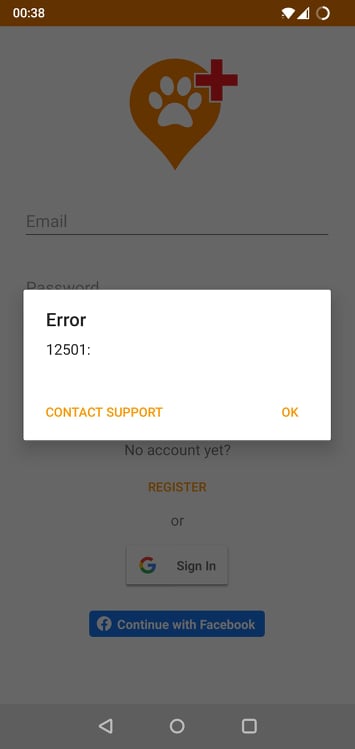
Login screen > Select Google Sign in and tap outside of the pop-up > Error 12501 #69
Description
Description
When a user initiates login with the Google form and then changes their mind / taps outside the Google login pop-up by mistake, an error is displayed.
Steps to reproduce
- Open the application as a non-logged in user
- Select the Google Sign In button -> Google login form is opened as a pop-up inside the application
- Tap anywhere outside of the pop-up
Expected result
The pop-up is closed and the login page in the app is available.
Actual result
Error 12501 is displayed.
Test Data
version - 5.1.0(82)
device - Android 11, OxygenOS 11.1.2.2 for OnePlus 6
Activity
[-]Log in screen > Click on Google Sign in and click outside of the pop-up > Error 12501[/-][+]Log in screen > Select Google Sign in and tap outside of the pop-up > Error 12501[/+][-]Log in screen > Select Google Sign in and tap outside of the pop-up > Error 12501[/-][+]Login screen > Select Google Sign in and tap outside of the pop-up > Error 12501[/+]