Repository navigation
IntelliSense under clang-x64 doesn't support Microsoft integer suffixes #11585
Description
Environment
- OS and Version: Windows 10 Enterprise LTSC 21H2 (10.0.19044.3570)
- VS Code Version: 1.83.1
- C/C++ Extension Version: 1.17.5
- LLVM Version: 17.0.2
Bug Summary and Steps to Reproduce
Bug Summary:
When using IntelliSense mode clang-x64, IntelliSense doesn't recognize Microsoft integer suffixes (which are used in the Windows SDK), however it works when using IntelliSense mode msvc-x64. Despite that, these suffixes compile on Clang.
Steps to reproduce:
- Create a main.c file containing:
int main(void) { return 0i32; }
or
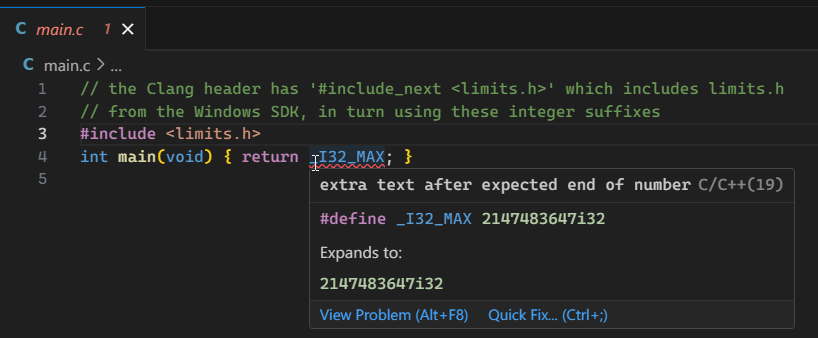
// the Clang header has '#include_next <limits.h>' which includes limits.h
// from the Windows SDK, in turn using these integer suffixes
#include <limits.h>
int main(void) { return _I32_MAX; }
- Set IntelliSense mode to clang-x64 in c_cpp_properties.json
- Hover over integer constant
- See error squiggle "extra text after expected end of number"
- Compile using this command line:
clang main.c -Weverything -o main.exe - No warnings or errors generated
Expected behavior:
Shouldn't display any error, or perhaps an error about compiler portability that explicitly states it's a Microsoft extension.
Configuration and Logs
c_cpp_properties.json:
{
    "configurations": [
        {
            "name": "Win32",
            "compilerPath": "C:/Program Files/LLVM/bin/clang.exe",
            "intelliSenseMode": "clang-x64",
            "configurationProvider": "ms-vscode.cpptools"
        }
    ],
    "version": 4
}
Logs:
-------- Diagnostics - 10/25/2023, 3:26:01 PM
Version: 1.17.5
Current Configuration:
{
    "name": "Win32",
    "compilerPath": "C:/Program Files/LLVM/bin/clang.exe",
    "intelliSenseMode": "clang-x64",
    "configurationProvider": "ms-vscode.cpptools",
    "compilerPathIsExplicit": true,
    "cStandardIsExplicit": false,
    "cppStandardIsExplicit": false,
    "intelliSenseModeIsExplicit": true,
    "compilerPathInCppPropertiesJson": "C:/Program Files/LLVM/bin/clang.exe",
    "configurationProviderInCppPropertiesJson": "ms-vscode.cpptools",
    "mergeConfigurations": false,
    "browse": {
        "path": [
            "${workspaceFolder}"
        ],
        "limitSymbolsToIncludedHeaders": true
    }
}
cpptools version (native): 1.17.5.0
Translation Unit Mappings:
[ E:\vscode-cpptools bug\main.c ]:
    E:\vscode-cpptools bug\main.c
Translation Unit Configurations:
[ E:\vscode-cpptools bug\main.c ]:
    Process ID: 1268
    Memory Usage: 54 MB
    Compiler Path: C:\Program Files\LLVM\bin\clang.exe
    Includes:
        C:\Program Files\LLVM\lib\clang\17\include
        C:\Program Files\Microsoft Visual Studio\2022\Preview\VC\Tools\MSVC\14.37.32820\include
        C:\Program Files\Microsoft Visual Studio\2022\Preview\VC\Tools\MSVC\14.37.32820\atlmfc\include
        C:\Program Files (x86)\Windows Kits\10\Include\10.0.22621.0\ucrt
        C:\Program Files (x86)\Windows Kits\10\Include\10.0.22621.0\shared
        C:\Program Files (x86)\Windows Kits\10\Include\10.0.22621.0\um
        C:\Program Files (x86)\Windows Kits\10\Include\10.0.22621.0\winrt
        C:\Program Files (x86)\Windows Kits\10\Include\10.0.22621.0\cppwinrt
    Standard Version: c17
    IntelliSense Mode: windows-clang-x64
    Other Flags:
        --clang
        --clang_version=170002
        --ms_compatibility
Total Memory Usage: 54 MB

------- Workspace parsing diagnostics -------
Number of files discovered (not excluded): 5486
Other Extensions
Same behavior when the only enabled extension is C/C++.
Additional context


Reacted by Andrew and Chris Idema
Activity
Colengms commentedon Oct 25, 2023
Hi whypet . Thanks for reporting this. I've opened an internal bug against VS, as this issue also occurs in VS and is in IntelliSense code that is shared with VS. (ID 1908009).
Colengms commentedon Oct 25, 2023
whypet Also, FYI, this line in your configuration appears to be invalid:
This field is for specifying the ID of a custom configuration provider, such as CMake Tools and Makefile Tools. I don't think having an incorrect value here is going to hurt, but I'd suggest removing it, just in case.
whypet commentedon Oct 25, 2023
Hey, thanks for the heads-up, I'll remove that line from my configurations. I remember thinking it was needed because I was using CMake Tools and ended up having issues with it not giving IntelliSense some information like include directories, so I tried to do it manually.
bobbrow commentedon Oct 26, 2023
CMake Tools will only provide information for headers if you list the headers in your
add_executable/add_libraryinvocations. Otherwise, you can get the information transitively by opening a source file that includes that header.whypet commentedon Oct 27, 2023
I see, thanks. Maybe I was facing these issues because I use
target_sourcesto list all source and header files instead but I'm not sure, I'm a bit new to CMake as a whole.nlov commentedon Nov 16, 2024
Thanks whypet for filing this bug originally - can confirm it's still happening on my end too after an install of VS 17.12.0 with restart. Windows 11 Pro build 22631, VSCode 1.95.3, C/C++ extension version 1.22.11, LLVM version 19.1.3. IntelliSense Mode clang-x64.
Thank you in the meantime for this overall wonderful software.
From the helpful C/C++ Log command, I've got similar includes as whypet:
(The variants of macros are written below just for completeness; only the macros without the leading underscores would be used normally of course. The bug still lies with the integer suffixes not being recognized when IntelliSense Mode clang-x64 is used.)
ChrisIdema commentedon Jan 30, 2026
I have the same issue. Integer constants like
INT64_MAXproduce errors in problems pane, because IntelliSense is using MSVC headers instead of clang headers. But building and running works.I get:
It uses header:
C:\Program Files\Microsoft Visual Studio\2022\Community\VC\Tools\MSVC\14.44.35207\include\stdint.hinstead of:
C:\LLVM_19.1.3\lib\clang\19\include\stdint.hmy c_cpp_properties.json:
I tried setting up my c_cpp_properties.json in various ways, but nothing worked. Resetting IntelliSense database or restarting VS Code did not work.
This makes IntelliSense unusable for me. I have to use clangd instead.
My system:
Colengms commentedon Oct 20, 2026
I believe the original issue may have been addressed some time ago. I no longer get warnings in clang mode for code such as:
or:
Closing this issue as fixed.
Chris Idema (@ChrisIdema) Your issue appears to be unrelated to this thread. If you're still seeing that, let us know. The C/C++ Extension invokes clang or gcc directly to query what system include paths it is using (based on the compiler args, as that can influence that) - which is generally reliable. Include paths used by IntelliSense should match what was configured for that source file in
compile_commands.json(or simply the include paths returned from clang.exe by default, if the repro'ing file does not correspond to one of yourcompile_commands.jsonentries). If you're still seeing an issue, the specificcompile_commands.jsoncommand line involved would be useful information for investigating further.