Repository navigation
IntelliSense Parse Directory Exclusions #2192
Description
Type: LanguageService
C/C++
Describe the bug
- OS and Version: Windows 10 RS4
- VS Code Version: 1.24.1
- C/C++ Extension Version: 0.17.5
- Other extensions you installed (and if the issue persists after disabling them): None
- A clear and concise description of what the bug is:
IntelliSense seems to parse every folder within a workspace without any regard for the "files.exclude" workspace setting. This leads to very long parse times as it seems that IntelliSense tries to parse unnecessary files.
Expected behavior
IntelliSense should not attempt to parse files in excluded directories.
Activity
sean-mcmanus commentedon Jun 27, 2018
Hmm...we are supposed to look at files.exclude. Can you provide more info? Are you excluding certain folders? How do you know those excluded folders are being parsed? Are you opening files in those excluded folders? Are you using WSL? Are you using recursive includes? If you set the C_Cpp.loggingLevel to "Debug" you can see which files we are parsing, although you may need to do a Reset IntelliSense Database command if all the files are already parsed. We bypass file-based exclusions unless C_Cpp.exclusionPolicy is set to checkFilesAndFolders (due to performance issues).
canfoderiskii commentedon Sep 17, 2018
Hi, Sean McManus (@sean-mcmanus)
Really need this feature!
Here is my example:
The image below shows I excluded a few unrelated platform's header files, leaving only one platform header file(see side bar on left side).
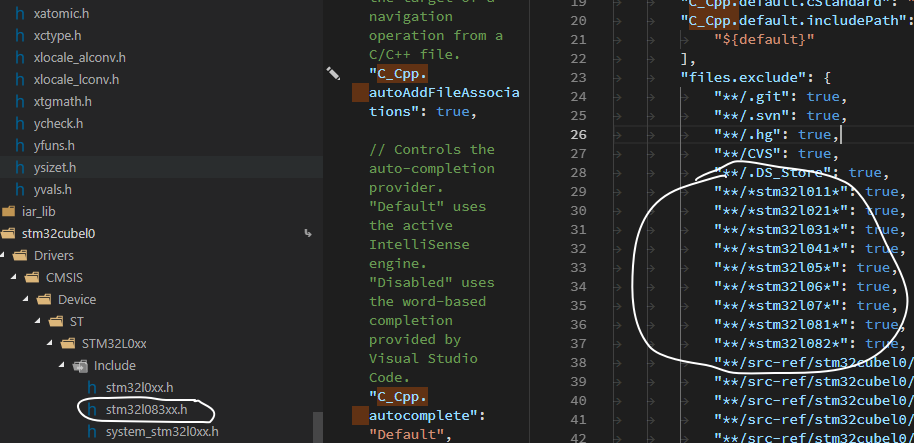
All those platform header files have symbol
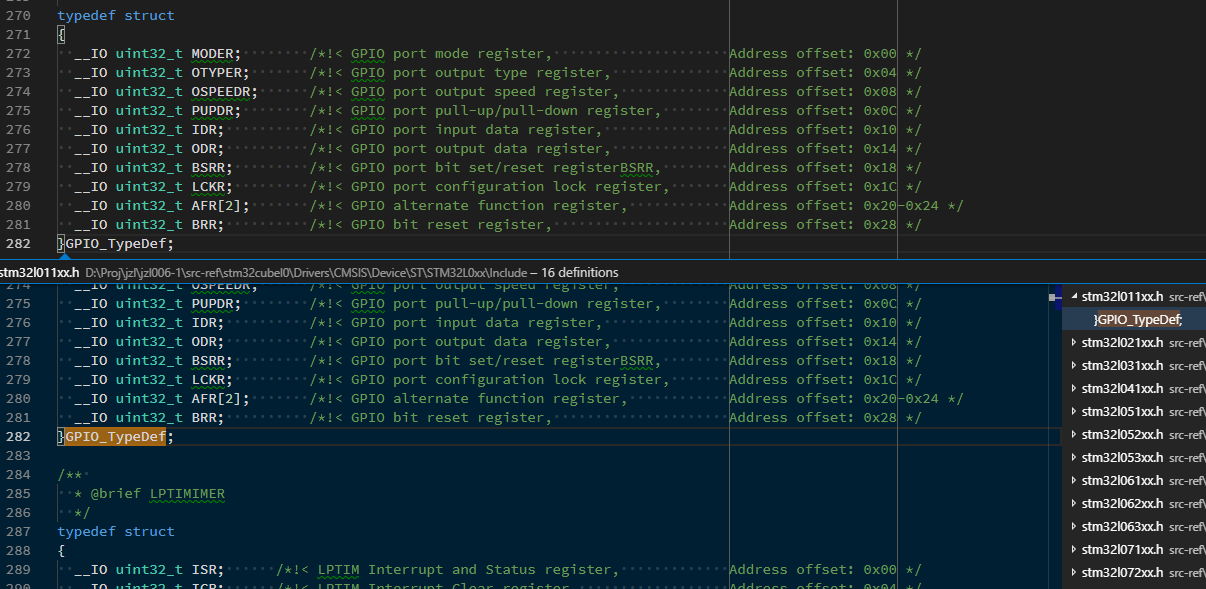
GPIO_TypeDefand this symbol is commonly used in my code.When I press
F12trying toGo to Definitionfor that symbol, the edior lists all the definitions including those platforms which are expected to be excluded. See the screenshot blow.sean-mcmanus commentedon Sep 17, 2018
canfoderiskii (@canfoderiskii) It looks like you're using file-based exclusions. Does setting the C_Cpp.exclusionPolicy to "checkFilesAndFolders" fix the issue for you? FYI, having a long list of file exclusions will slow down our operations because it's expensive to run the exclusion checking for every file. We're currently working on IntelliSense-based Go to Def, which should fix the "too many incorrect" results behavior -- assuming IntelliSense-based hover shows only 1 result with your scenario. I wasn't able to repro the original issue reported.
canfoderiskii commentedon Sep 18, 2018
Hi, Sean McManus (@sean-mcmanus)
My bad, I missed
C_Cpp.checkFilesAndFoldersearlier. This configuration actually works.Is there any suggestion for avoiding adding too many file exclusion in my scenario? There are various platforms' code in the same directory and I have to exclude most of them.
sean-mcmanus commentedon Sep 18, 2018
canfoderiskii (@canfoderiskii) Well, if you can do something to only exclude folders that would be preferred -- we just use the checkFolders default so the initial Open Folder experience is faster (and is sufficient for most projects). However, the only code that has its performance affected is when it says "Discovering files: " over the database icon in the bottom right, which may be fast enough if your workspace isn't too large -- that processing just looks for new/modified files to add to our database, so if the files are already in our symbol database from a previous activation of our extension, then the speed of that operation doesn't matter -- i.e. only newly added/modified files that got changed while our extension wasn't running would be have their files/symbols delayed.
canfoderiskii commentedon Sep 18, 2018
Sean McManus (@sean-mcmanus) Got it. Thank you for the reply.
toxazol commentedon Jan 22, 2020
Hi, I'm having the same issue. checkFilesAndFolders - checked. Though I'm using WSL
sean-mcmanus commentedon Jan 22, 2020
toxazol Can you file a new issue with more repro info? Are you using WSL through the remote extensions? (that is the recommended method).