You signed in with another tab or window. Reload to refresh your session.You signed out in another tab or window. Reload to refresh your session.You switched accounts on another tab or window. Reload to refresh your session.Dismiss alert
{{ message }}
Repository navigation
Intellisense (and most features of this extension) Not Working #4614
Fact: My code is able to build correctly using non vscode command line and goma build tools. I have copied my c_cpp_properties.json against someone who's C/C++ extension works correctly on this code base and they are identical.
Expect: Features of this extension expected to work correctly.
Actual:
"Go to definition" frequently sits and spins without producing result. Inconsistently able to work sometimes.
Inconsistent red underline over everything.
No autocomplete
Includes not able to find every file (sometimes it will say it can't find an include, but then "go to definition" will work???).
Reality: It's clear almost no part of this extension works correctly on my machine decreasing my productivity.
Red underline, error: "not a class or struct name"
Try to go to definition, vscode can tell it's a class or struct name. 🤷♀️
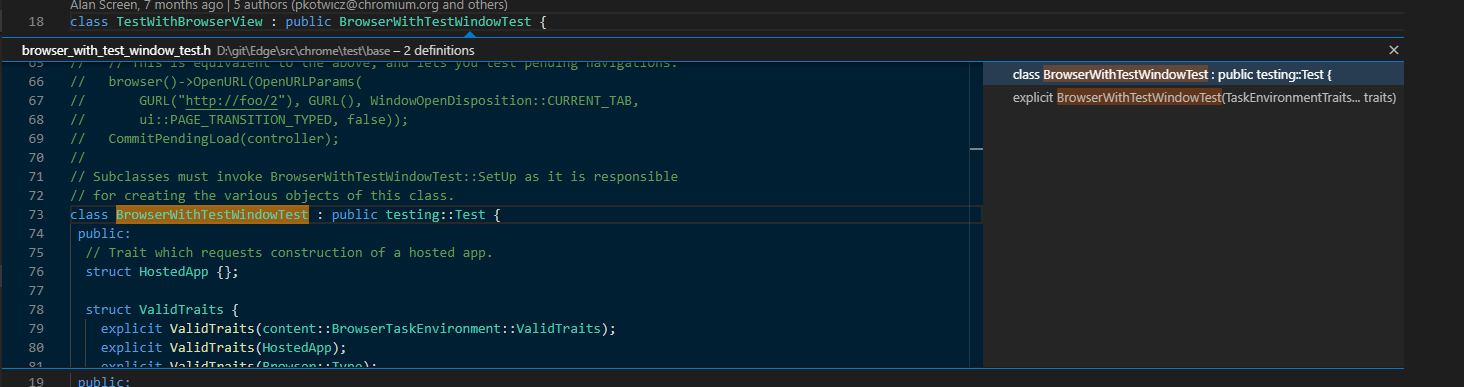
Red underlines disappear, completely only to come back and underline everything after. Not working correctly at all.
Can you use the C/C++: Log Diagnostics command to see what includes and defines we're using and if they're incorrect? By default we use recursive includes, which doesn't give 100% correct result in all workspaces (e.g. if the non-deterministic includePath ordering causes the wrong file to get used).
I tried a version of chromium and wasn't able to repro the bug.
Go to Def on #include lines doesn't use the IntelliSense includePath for lookups (there's another issue tracking that).
xgdgsc Your diagnostic log file shows no IntelliSense process is active. Are you able to enable debug logging (https://code.visualstudio.com/docs/cpp/enable-logging-cpp) and see what error message is shown when it tries to create the IntelliSense process? Also, if you could only specify only a configurationProvider or compileCommands, that would help narrow down the problem.
Custom configuration provider 'CMake Tools' registered
Quick info operation failed: FE: 'Compiler exited with error - No IL available'
cpptools/fileCreated
cpptools/getCodeActions: 186
cpptools/activeDocumentChange
cpptools/textEditorSelectionChange
cpptools/getDocumentSymbols: 187
cpptools/getDocumentSymbols
cpptools/textEditorSelectionChange
idle loop: reparsing the active document
Checking for syntax errors: file:///home/sgao/Documents/sim/src/bar_exec.cpp
Queueing IntelliSense update for files in translation unit of: /home/sgao/Documents/sim/src/bar_exec.cpp
cpptools/getCodeActions: 188
cpptools/textEditorSelectionChange
cpptools/getCodeActions: 189
Error squiggle count: 1
Update IntelliSense time (sec): 0.65
cpptools/getCodeActions: 190
Database safe to open
cpptools/fileDeleted
Database safe to open
cpptools/activeDocumentChange
cpptools/textEditorSelectionChange
idle loop: reparsing the active document
Checking for syntax errors: file:///home/sgao/Documents/sim/src/bar_exec.cpp
Queueing IntelliSense update for files in translation unit of: /home/sgao/Documents/sim/src/bar_exec.cpp
Error squiggle count: 1
Update IntelliSense time (sec): 0.68
cpptools/getCodeActions: 191
cpptools/fileCreated
cpptools/fileDeleted
cpptools/getDocumentSymbols: 212
cpptools/getDocumentSymbols
cpptools/fileCreated
cpptools/fileDeleted
Database safe to open
cpptools/fileCreated
cpptools/fileDeleted
cpptools/fileCreated
cpptools/fileDeleted
cpptools/fileCreated
cpptools/fileDeleted
cpptools/fileCreated
cpptools/fileDeleted
cpptools/fileCreated
cpptools/fileDeleted
cpptools/fileCreated
cpptools/fileDeleted
cpptools/fileCreated
cpptools/fileDeleted
cpptools/fileCreated
cpptools/fileDeleted
cpptools/fileCreated
cpptools/fileDeleted
cpptools/fileCreated
cpptools/fileDeleted
cpptools/fileCreated
cpptools/fileDeleted
cpptools/fileCreated
cpptools/fileDeleted
cpptools/fileCreated
cpptools/fileDeleted
cpptools/fileCreated
cpptools/fileDeleted
cpptools/fileCreated
cpptools/fileDeleted
cpptools/fileCreated
cpptools/fileDeleted
cpptools/fileCreated
cpptools/fileDeleted
cpptools/activeDocumentChange
cpptools/textEditorSelectionChange
idle loop: reparsing the active document
Checking for syntax errors: file:///home/sgao/Documents/sim/src/bar_exec.cpp
Queueing IntelliSense update for files in translation unit of: /home/sgao/Documents/sim/src/bar_exec.cpp
Error squiggle count: 1
Update IntelliSense time (sec): 0.6
Colen Garoutte-Carson (@Colengms) Can you investigate this -- I'm seeing the forced include file sim_core_CXX_prefix.hxx causing the compiler to generate a fatal error, causing defines to be missing when it queries /usr/bin/g++-9. I think maybe we should not pass forced includes arguments to the compiler when we query it for compiler defaults.
xgdgsc Are you able to somehow get that "fatal error" showing the log to be fixed. Or maybe remove the "-include", "....hxx" and pass it via the forcedInclude setting....although that appears to be coming from the CMake Tools extension (so it could be a bug with that extension).
This started to appear recently for me. There is nothing obvious in the diagnostics log at all. I'm using version 0.29 of the extension. Is this a regression?
Grigori Goronzy (@grigorig) Could you file a new issue with more repro details? We're not aware of a regression like this.
Activity
sean-mcmanus commentedon Nov 15, 2019
Can you use the C/C++: Log Diagnostics command to see what includes and defines we're using and if they're incorrect? By default we use recursive includes, which doesn't give 100% correct result in all workspaces (e.g. if the non-deterministic includePath ordering causes the wrong file to get used).
I tried a version of chromium and wasn't able to repro the bug.
Go to Def on
#includelines doesn't use the IntelliSense includePath for lookups (there's another issue tracking that).Can you provide more detailed repro steps?
xgdgsc commentedon Nov 16, 2019
I also began to see this intellisense not working properly since maybe a day or two. Might after vscode update?
here' s my
C/C++: Log Diagnostics commandoutput. I tried reinstalling C++ extension. This is stable version, not insider version.xgdgsc commentedon Nov 16, 2019
Just tried insider build and also not showing auto complete correctly.
xgdgsc commentedon Nov 17, 2019
It started working well for me after reinstalling stable release after trying insider.
xgdgsc commentedon Nov 18, 2019
I was wrong, completion of type works but not class methods
xgdgsc commentedon Nov 19, 2019
Deleting the extension folder
~/.vscode/extensions/ms-vscode.cpptools-0.26.1/and reinstalling seems to fix it for mexgdgsc commentedon Nov 19, 2019
It stopped working again for me 😓
sean-mcmanus commentedon Nov 19, 2019
xgdgsc Your diagnostic log file shows no IntelliSense process is active. Are you able to enable debug logging (https://code.visualstudio.com/docs/cpp/enable-logging-cpp) and see what error message is shown when it tries to create the IntelliSense process? Also, if you could only specify only a configurationProvider or compileCommands, that would help narrow down the problem.
xgdgsc commentedon Nov 20, 2019
Thanks. It shows log like:
sean-mcmanus commentedon Nov 20, 2019
Is there stuff before that log? I don't see the output when it tries to create the TU initially.
xgdgsc commentedon Nov 20, 2019
I found it works after opening the folder of "MyProject" directly. I was using a workspace file on the parent directory MyProject.code-workspace.
xgdgsc commentedon Nov 20, 2019
It stopped again. log at https://gist.github.com/xgdgsc/1667c7bbe5b260feda9be5e84e418201
sean-mcmanus commentedon Nov 20, 2019
I'm OOF till Friday.
Colen Garoutte-Carson (@Colengms) Can you investigate this -- I'm seeing the forced include file sim_core_CXX_prefix.hxx causing the compiler to generate a fatal error, causing defines to be missing when it queries /usr/bin/g++-9. I think maybe we should not pass forced includes arguments to the compiler when we query it for compiler defaults.
xgdgsc Are you able to somehow get that "fatal error" showing the log to be fixed. Or maybe remove the
"-include", "....hxx"and pass it via the forcedInclude setting....although that appears to be coming from the CMake Tools extension (so it could be a bug with that extension).xgdgsc commentedon Nov 20, 2019
Thanks for the tip. The file reported as fatal error exists. I disabled cotire in CMakeLists and it works.
bobbrow commentedon Feb 20, 2020
We're tracking #4655 as the fix for this.
sean-mcmanus commentedon May 6, 2020
xgdgsc With https://github.com/microsoft/vscode-cpptools/releases/tag/0.28.0-insiders2 the failure caused by "-include" being used should be fixed. Let us know if you hit any other issues.
grigorig commentedon Jul 29, 2020
This started to appear recently for me. There is nothing obvious in the diagnostics log at all. I'm using version 0.29 of the extension. Is this a regression?
sean-mcmanus commentedon Jul 30, 2020
Grigori Goronzy (@grigorig) Could you file a new issue with more repro details? We're not aware of a regression like this.