Repository navigation
react-native bundle configs #14400
Description
Activity
Hi there! This issue is being closed because it has been inactive for a while. Maybe the issue has been fixed in a recent release, or perhaps it is not affecting a lot of people. Either way, we're automatically closing issues after a period of inactivity. Please do not take it personally!
If you think this issue should definitely remain open, please let us know. The following information is helpful when it comes to determining if the issue should be re-opened:
- Does the issue still reproduce on the latest release candidate? Post a comment with the version you tested.
- If so, is there any information missing from the bug report? Post a comment with all the information required by the issue template.
- Is there a pull request that addresses this issue? Post a comment with the PR number so we can follow up.
If you would like to work on a patch to fix the issue, contributions are very welcome! Read through the contribution guide, and feel free to hop into #react-native if you need help planning your contribution.
I also just ran into this issue. I got symlinks working with the metro client, by passing in a custom config as suggested in react/metro#1. But the bundler doesn't pick up the config file. The only current solution is to edit the
react-native-xcode.shfile inside the react-native node module, but that is obviously not a great solution. Simply being able to pass an environment variable to the config via xcode would already help a lot. @hramos could you reopen, I would consider doing a pull request to implement passing the config location in some config, if there is an agreement how to do it.@wprater @SoHotSoup I got it working in the meantime.
In Xcode you can assign an environment variable in the build phase
Bundle React Native code and imagesby adding the lineexport BUNDLE_CONFIG=./metro.config.jsto the script:
In Android you just have to include
bundleConfig: "./metro.config.js"in theproject.ext.reactfield of yourandroid/app/build.gradle: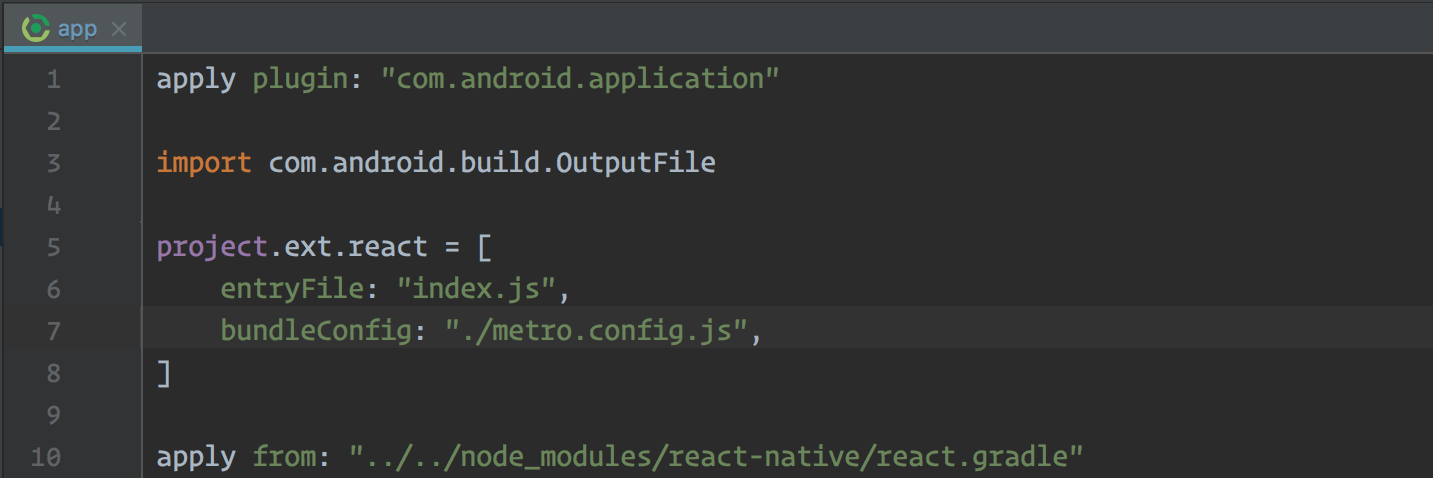 Reacted by Eben Bitonte
- locked as resolved and limited conversation to collaborators
on Aug 16, 2018
Description
This is a react-native bundle and react-native packager issue.
Currently there is no way of modifying the configurations passed to
react-native bundlewhen building for iOS and Android. You are locked into the configs either the Debug/Release build config and build type respectively pass. Also, unlike what many recent posts about this might suggest about this issue, it seems you cannot just callreact-native bundleahead of the build with your params and have the native build pick that bundle up.Reproduction Steps and Sample Code
Configs for bundling in an iOS build are essentially hardcoded in
./node_modules/react-native/packager/react-native-xcode.shto scheme configuration set in Xcode. If you set the build type to debug, you have then set dev to true, and there is no way of making a debug build, signed with developer certs with an offline bundle. The same is true for the opposite. I have not yet found a way around this without changing react-native-xcode.sh or the bundle React Native build phase in Xcode.Configs for Android are slightly easier to change if necessary, as
./android/app/build.gradlehas the project.ext.react property list that can be configured. By setting bundleInDebug to true, we can create an unsigned debug release with the bundle embedded. The problem is this requires changing the build.gradle each time, or doing something like this:and via Fastlane:
or directly in gradle:
$PROJECT/android/gradlew assembleDebug -p android -PbundleInDebug=trueAn example use case for this is internal alpha builds - where other developers or QA need a development build for debug access, not signed for release/appstore, and cannot be dependent upon a development server running. Hockeyapp is frequently used for this - distribution of these kinds of builds internally.
For beta builds that are a bit more open, the current configurations work fine and as intended for Testflight and Playstore beta.
Solution
There are a few possible solutions here, and I would be willing to make a PR for both better documentation and a new process, but would like input on what that process should be. This is clearly an issue, and I would like to see either how others have worked around it or solved it in the recent updates.
Solution 1:
We move the location of jsbundle to a predictable location (not derived data) allowing users to make a bundle however they choose ahead of the native build, and configure the native build to skip that particular build phase/step if that file is already present. We would also have to clean that folder at the end of a build. I believe this would be the easiest solution, but possibly the most breaking change.
Solution 2:
Keep the current order/flow of the native builds calling the bundle - Modify react-native-xcode.sh to allow for overriding properties passed in through xcargs and modify react.gradle to more easily accept property overrides from gradle. (this may already be possible through a better solution than above, as my understanding of groovy & gradle is not the best)
Solution 3:
Some combination of the above
Solution 4:
Tell me what I missed, because this isn't actually an issue, and close, and perhaps I should drink more coffee in the morning before submitting issues on GitHub.
Additional Information